About that video

After hours and hours of learning to use Adobe Premier Pro, more hours and hours of editing frame by frame, and two weeks of not posting because the video wasn’t done, I have decided to skip it. I realized that it’s not going to be something I want posted on youtube, and wasn’t going to be good enough to even show what I did with the grounding. I promised I would included it with my next post, and so I held off writing any new ones. So I’m cancelling the video. Once I get into doing more exciting things, I’ll be more excited to post them.

Anyway, I’m including a list of the parts I used to set my workstation up with a grounded anti-static mat. I’m excited to get working on projects, and not worrying about working on a video that is going to make me depressed anyway will give me a chance to get started on them.

You can click on any of these images to be taken to the amazon link for the product.

First the mat:

I got a mat large enough to cover the desk I linked in the previous post. In fact, I got one too big and had to trim it down. Luckily some sewing scisors cut right through it like butter. The top of the mat is rubber and the bottom has a static dispursing plastic film. It’s quite a bit heavier than I expected.

Grounding snap kit:

To install the grounding kit, you will have to cut a small hole into the mat. I just used the tip of a box cutter. Be careful though, the box cutter is easy to make a cut that is too large for the kit. You only need the tip to go through, just enough to stick the screw through to the other side. Once you have that, you just put the screw into the snap side you need, then the washer, and then press it into the hole and screw on the back side. Tighten up with a screw driver and it’s done. The wired plate snaps right on to the mat now to carry away any of that pesky static.

Plug kit:

There are two screws you need to undo to get the grounding kit wired up to this screw. The first is the outside, to remove the cover, then there is the one on the grounding post (the bottom of the 3 posts in a US plug). Make sure to thread the wire through the housing before mounting it to the ground post. Then you just put everything back together the same way you took it apart. I had to bend the post inside the plug a little to accomodate the grounding wire, just make sure it’s not shorted to any other post. Because the other two posts are not wired internally, they are an open circut and no power flows through the plug, it is simply grounded. Now you have a grounded plug.

Power strip:

I wanted a plug that would attach to the desk so that I could easily plug things in near to where I was working. Nothing special about attaching this. Just opened the jaws all the way and slid it on over the desk frame and top then tighted the jaws. Easy.

And that’s it. My workstation now has a grounded anti-static mat and power strip. It is ready to accept electronics tools. I haven’t been able to afford any yet, but I did hunt down my old soldering iron and heat gun. It’s not really the kind of heat gun you’d use for electronics, but I probably can use it for desoldering surface mount components. Next up I need to get a lap for lighting my work better.
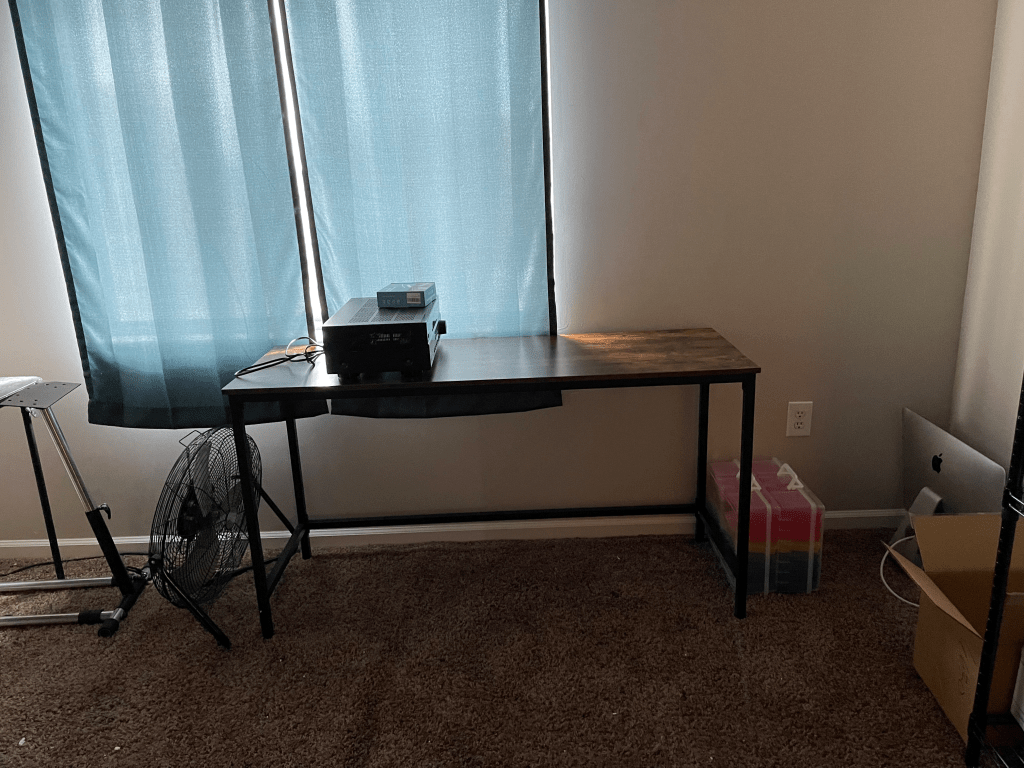
Electronics workbench

The first part of my electronics workbench came about a week ago, but I was waiting for more parts to put it together. But my wife, the supportive person she is, put it together for me while I was streaming on saturday. And like I promised in a previous post, I have a picture of it for you.

A desk in front of window with electronics on top.
Start of my electronics workbench

As you can see, I’ve selected a place in front of a window so that I can open it for venting any fumes. I also have a power outlet nearby. And on top, I have my first little project. We bought a cheep receiver but never purchased any speakers for it. We just couldn’t afford a good set. And while it was sitting there it got bumped around or something. We finally did get some speakers a few weeks ago and the receiver no longer output any signal to the speakers. That was frustrating. But it is kind of exciting for me. I get a bunch of components to harvest. I get some practice desoldering, identifying componets and testing them.

I have my anti-static mat and grounding cable on it’s way. Should be here today. I’m thinking I’ll make a video of setting it up and post it on youtube. I’ll post the video in my next post!

A low week and a new table

So, I don’t make it a secret that I have bipolar disorder because it shapes a lot of my mood, and so it shapes a lot of how people perceive me. Even though I take meds to balance me (lithium, lamotrigine, and escitaloprám) from swinging too far in one direction or the other, it doesn’t always keep it from happening. And so I still have periods of hypomania and depression.

You would think, since it’s my brain and my moods, I would know right off when it changes. But it’s not that easy. The best analogy I can come up quickly is think of the smells in your home. In my home, we cook food with a lot of italian and mexican spices, and we like them to be fresh, so we have Aerogardens all over the house with tomatoes, jalapeños, basil, oregano, thyme, chives, parsley, sage, cilantro (which I guess is also known as coriander in other places), and dill growing. We just walk up to them when we’re cooking and grab a sprig or two and then throw it in the pot. We don’t notice the smells unless we’re up close and disturbing the plant (oh man fresh basil smells so good when you brush past it). But when we have visitors they always ask what we’re cooking (“You making spaghetti sauce?”).

That’s how bipolar is for me. Unless something rubs it the wrong way I don’t notice it until someone else points it out to me, usually by asking me what’s wrong with me. Even with my wife helping me to keep track of these things, I’m about 3-5 days behind what the rest of the world already sees. And last week it was depression, a low week. I don’t know when it started or when it ended, but what I’m excited about is that I was able to carry my interest in building my cyberdeck through it, though my excitement for rushing into building the cyberdeck is a bit more subdued because of all the doubt and challenges injected into my plans. It’s going to be a longer process than I imagined before. But that’s okay, it gives me more things to learn and more time for them to stick.

Anyway, the exciting part of the post is that my wife is starting to see that I plan on going through with this hobby, and ordered me the first piece of hardware for my electronics workbench. The workbench! I tried to pick one out that was as big and cheap as I could get. This one is almost 5 feet (55 * 2.54 = 139.7cm) wide, and almost 2 feet (19.7 * 2.54 = 50cm) deep.

You’ll notice those are Amazon affiliate links. I’ve set up an account so that if you are interesting in purchasing any of the bits I’ll be ordering off Amazon you have the option of using one of those links and maybe helping me get some extra $ to further the nerdy works I plan on sharing here. Don’t worry, I won’t be posting anything I didn’t buy first.

Once I get the table put together, I’ll post a picture of it in its new home to show progress of how the electronics workbench is coming together. The next item on the list is an antistatic mat to go over the whole top and a way to ground it to my home grounding. I don’t know how far out that purchase will be, but I’ll be sure to put up a new post when it happens.

And lastly, I’ve come up with a new electronics project I want to work on. I’ll write the details of that one in my next post.