About that video

After hours and hours of learning to use Adobe Premier Pro, more hours and hours of editing frame by frame, and two weeks of not posting because the video wasn’t done, I have decided to skip it. I realized that it’s not going to be something I want posted on youtube, and wasn’t going to be good enough to even show what I did with the grounding. I promised I would included it with my next post, and so I held off writing any new ones. So I’m cancelling the video. Once I get into doing more exciting things, I’ll be more excited to post them.

Anyway, I’m including a list of the parts I used to set my workstation up with a grounded anti-static mat. I’m excited to get working on projects, and not worrying about working on a video that is going to make me depressed anyway will give me a chance to get started on them.

You can click on any of these images to be taken to the amazon link for the product.

First the mat:

I got a mat large enough to cover the desk I linked in the previous post. In fact, I got one too big and had to trim it down. Luckily some sewing scisors cut right through it like butter. The top of the mat is rubber and the bottom has a static dispursing plastic film. It’s quite a bit heavier than I expected.

Grounding snap kit:

To install the grounding kit, you will have to cut a small hole into the mat. I just used the tip of a box cutter. Be careful though, the box cutter is easy to make a cut that is too large for the kit. You only need the tip to go through, just enough to stick the screw through to the other side. Once you have that, you just put the screw into the snap side you need, then the washer, and then press it into the hole and screw on the back side. Tighten up with a screw driver and it’s done. The wired plate snaps right on to the mat now to carry away any of that pesky static.

Plug kit:

There are two screws you need to undo to get the grounding kit wired up to this screw. The first is the outside, to remove the cover, then there is the one on the grounding post (the bottom of the 3 posts in a US plug). Make sure to thread the wire through the housing before mounting it to the ground post. Then you just put everything back together the same way you took it apart. I had to bend the post inside the plug a little to accomodate the grounding wire, just make sure it’s not shorted to any other post. Because the other two posts are not wired internally, they are an open circut and no power flows through the plug, it is simply grounded. Now you have a grounded plug.

Power strip:

I wanted a plug that would attach to the desk so that I could easily plug things in near to where I was working. Nothing special about attaching this. Just opened the jaws all the way and slid it on over the desk frame and top then tighted the jaws. Easy.

And that’s it. My workstation now has a grounded anti-static mat and power strip. It is ready to accept electronics tools. I haven’t been able to afford any yet, but I did hunt down my old soldering iron and heat gun. It’s not really the kind of heat gun you’d use for electronics, but I probably can use it for desoldering surface mount components. Next up I need to get a lap for lighting my work better.
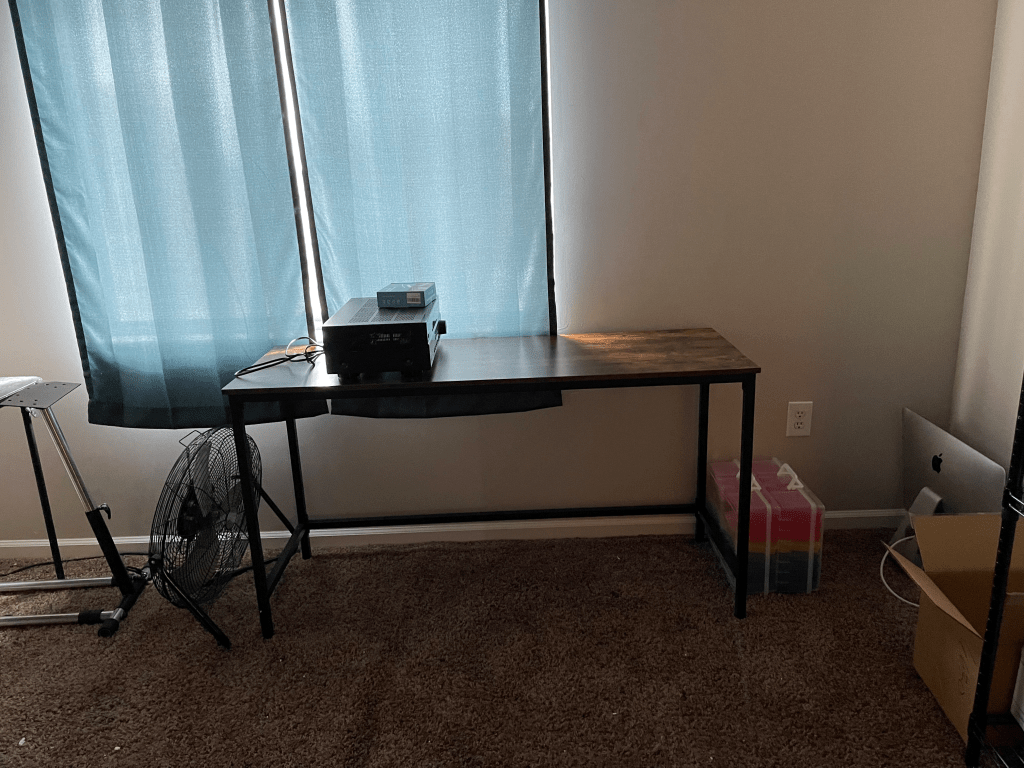
Electronics workbench

The first part of my electronics workbench came about a week ago, but I was waiting for more parts to put it together. But my wife, the supportive person she is, put it together for me while I was streaming on saturday. And like I promised in a previous post, I have a picture of it for you.

A desk in front of window with electronics on top.
Start of my electronics workbench

As you can see, I’ve selected a place in front of a window so that I can open it for venting any fumes. I also have a power outlet nearby. And on top, I have my first little project. We bought a cheep receiver but never purchased any speakers for it. We just couldn’t afford a good set. And while it was sitting there it got bumped around or something. We finally did get some speakers a few weeks ago and the receiver no longer output any signal to the speakers. That was frustrating. But it is kind of exciting for me. I get a bunch of components to harvest. I get some practice desoldering, identifying componets and testing them.

I have my anti-static mat and grounding cable on it’s way. Should be here today. I’m thinking I’ll make a video of setting it up and post it on youtube. I’ll post the video in my next post!

Almost got me

Yesterday I talked about looking at IMUs for a project. I thought I had found the unit I wanted. It is a Bosch BMF055. It includes the Accelerometer, Gyroscope, Magnometer, and also an SAMD20 32biti Cortex M0+ processor. All for about $10 on digikey. Sounds nice, right? Does all the things I wanted, right? Yep.

But then I was going over the datasheet for like the 5th time, and saw this section:

“8.2 Programming and debug interface
The MCU can be programmed and debugged via Atmel debugging tools using the SWD interface.”

Okay, I thought, what does that involve. So I searched for what that involves. Wll, it looks like it involves aditional hardware. I can save up for something small. It looks like this is the required piece of hardware for programming atmel chips. Fine, I think. I can just add that to my collection of required tools for electronics. I’m sure something in the future would end up needing that and it would be good to already have it.

So, does that require anything else? How does this get the code into the chip? Is it just a loader like the Arduino IDE? I looked into the user guide and found:

“1.3 System Requirements
The Atmel-ICE unit requires that a front-end debugging environment Atmel Studio version 6.2 or later is installed on your computer.”

This means it does require specific software. I spent some time hunting around for Atmel Studio and after some time found out that Atmel is now called Microchip, and Atmel Studio is now Microchip Studio. After a bit of hunting I found that Microchip Studio is free, which is nice. But from reading a bit on the allaboutcircuits forum, it seems that Microchip Studio might be going away, and I’d be forced into purchasing MPLAB, which is also free. But will it support the hardware programmer?

And on and on it goes. Looks like there is some beta support, and what I really should be using is is something like this debugger/programmer. That is definately cheaper, but it may also require this little helper. And it would also require I use MPLAB.

So, instead of having this one chip decide all this difficult dev chain for me, I think it’s probably just going to be easier to find an IMU without the MCU and need for programming. So, now I’m leaning more toward a chip like this one. This chip looks like it’d be much easer to get programmed since it uses I2C and is only programming interrupts.

I’m going to have to remember to always check these things on all the chips I want to select for my project. Good to remember, and I’m glad I found this before I bout 5 or so IMUs.

Another project idea

I mentioned in my previous post that I’d come up with a new project that I want to work on, and that I’d describe it in my next post. Well, here’s the next post.

My wife and I are looking to buy a pistol. Her biggest concern (other than keeping it locked away, mostly from me) is the recoil. My biggest concerns are comfort, ease of maintenance, ability to shoot easily with, and durability. I’ve long liked Glocks. We’ve gone shooting a few times together, a couple times renting guns at the shooting range, a couple times with friends, and once with my dad. On top of that, I grew up shooting, received top accuracy in my hunter saftey course (wayyyyy back in the 90s) and was the youngest competitive shooter in my grandpa’s shooting club. So we have a few points of reference for the guns we’re interested in. My wife like’s 9mm pistols, .22 rifles, and my dad’s .38 special. She also had some fun with his .50 caliber black powder rifle but it was a bit more recoil than she wanted to deal with constantly. She hates 12 gauge shotguns and 30-06 rifles.

But in picking our own, she’s mostly worried about recoil. I’ve looked up charts of the energy that pushes back against the gun, but the way that energy is felt is affected by a number of factors, some of which include the weight of the gun, the amount of powder in the cartridge, the weight of the bullet, the momentum of the moving parts in the gun. Almost every site I’ve looked at though says that recoil is much more subjective than the numbers in a table. I’m sure there are many more that could be added to that list, but she doesn’t care about the math that goes into the recoil energy. Well, actually, that might interest her, she has a BS in applied mathematics and is working on her MS in data science. But as far as buying a gun, she cares about how the recoil feels.

So, I’ve been trying to think of a way to quantize the feel of the recoil of a gun. At first I thought of just putting a pressure sensor somewhere on the backstrap so that when the gun is fired the pressure of the recoil against the hand can be measured. But that doesn’t tell the whole story of what you’re feeling when you shoot. So I thought, what about an accelerometer? That would give me the momentum changes, and that should give you more information about the pressure and movement of the gun. That is, until I realized accelerometers only give measurements about momentum, not angular velocity (rotational energy). But gyroscopes give you angular changes. So I realized I’d have to include both an accelerometer and a gyroscope. There are chips known as IMUs (Inertial Measurement Unit) and they include both, and often also include a magnometer to measure changes in relation to the earth’s magnetosphere. I’m not sure how I’d incorporate the magnometer, but I think I could map the motion of the gun with the other two sensors into some data that she could use to select a gun based on the feel of just one or two.

Then I started thinking of how to connect the sensor to the gun. Maybe an under barel attatchment of some sort would work, but I think the mechanical stress of shooting the gun would require a more permanent attachment, something that the shooting range might not appriciate on their rental guns. The measurements made under the barrel might not accurately represent the feel of the recoil in the user’s hand either. But a glove that is worn on the user’s primary hand might do the trick. I could measure the motion of the user’s hand when shots are fired. This would also allow me to make the sensor portable and quick to ready. I could even embed a pressure sensor or two in the palm for measuring the pressure against the hand.

So there it is, a shooting glove that measures the telemetry of recoil when firing a pistol. There might be something out there like this, but I have no doubt it would be expensive. Doing it myself would cost me a few dollars for the pcb at JLC, about $10 for the IMU at digikey, and a couple of bucks for incidental components, and as little as $3 for a bluetooth module to relay the information back to my phone, or similar for a usb port and data logger. I have two 3D printers and could print out any housings I need after desiging it in FreeCAD. It would take me some time to develop firmware for the device, and then a bit more time to write an application to gather and display the data from the device, whether that be for my iPhone or my computers. I’m fairly comfortable with C, C++, and Ruby, am a little rusty on Java, C#, and Python, Javascript, and could pick up Swift as needed. So all in all, I could probably have this up and running for about $50 and a bunch of hours. Who knows, people might be interested in this thing if there isn’t something around like it. Maybe not.